
Merge Multi-Page PDF Tables into One Clean CSV Automatically
Why multi-page PDF tables break manual copy-paste and basic scripts
Real-world government filings, bank statements, and quarterly reports rarely fit on a single page. Most PDF extractors emit one fragmented table per page—leaving you to manually stitch dozens of CSVs, remove repeated headers, realign margin-shifted duplex scans, and separate unrelated summary tables from detail tables.
Real visual proof: 16-page merge & multi-table separation
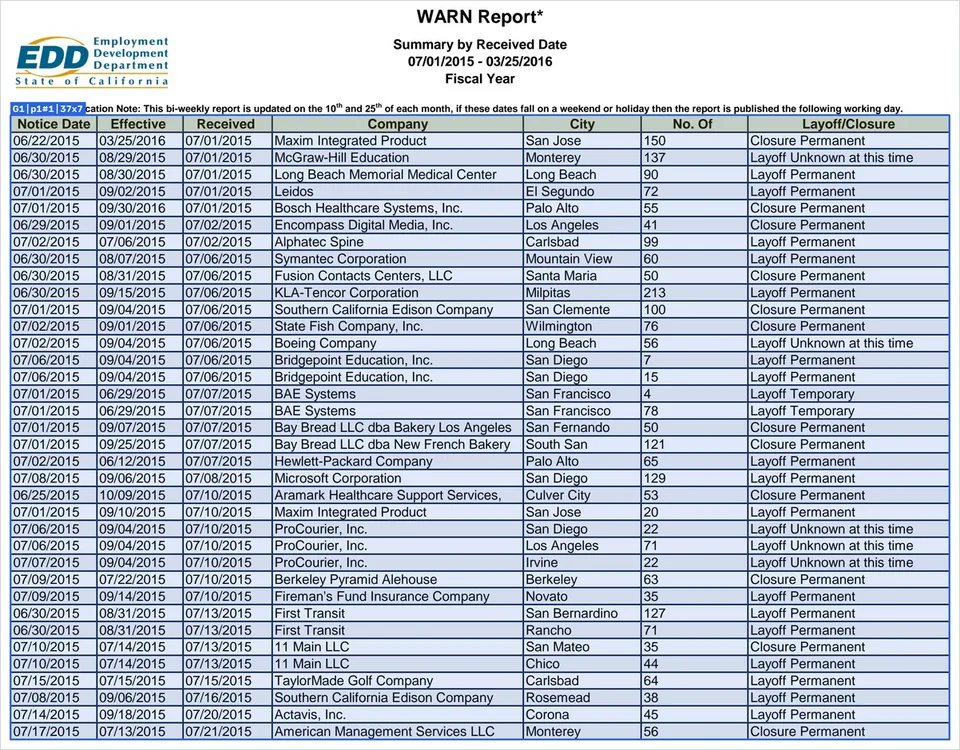
warn_report.pdf
(643 rows across 16 pages) merges into one clean CSV in 0.95 s.
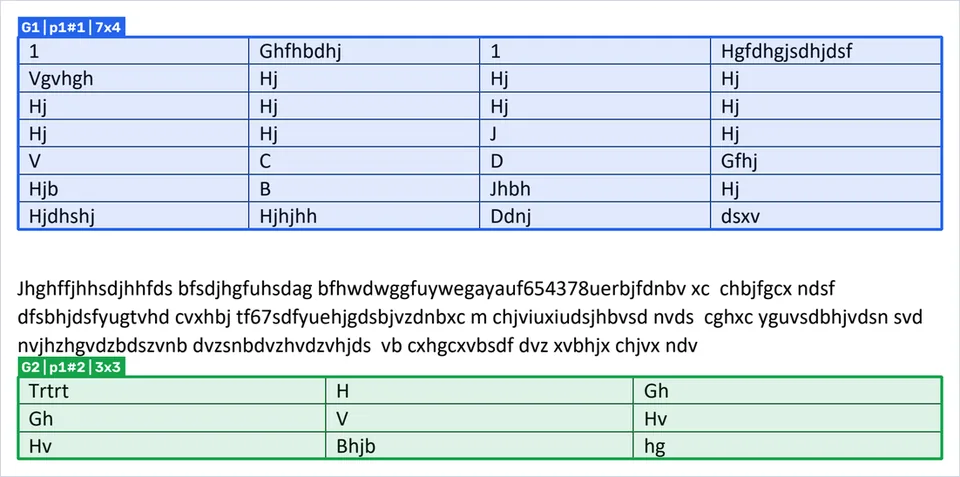
G1 (blue 4-col)
and G2 (green 3-col) stay in separate CSVs while prose is ignored.
How schema-matched multi-page merging works
| Grouping Mode | Web Option / CLI Flag | What Gets Exported |
|---|---|---|
| Schema Merge (Default) | Merge matching schemas / --merge schema | Combines multi-page continuations (with or without repeated headers) into one CSV per table schema while keeping distinct tables in separate CSV files. |
| Separate per Table | Separate CSV per table / --merge none | Writes an individual CSV for every raw table detected on each page. |
| Combine All | Combine all tables / --merge all | Concatenates every detected table in the document into one CSV file. |
- Unicode-safe fuzzy header matching: Matches repeated headers across Latin, Cyrillic, Arabic, Hebrew, and CJK scripts even when scanned OCR introduces a one-character typo.
- Margin-shifted headerless continuations: Compares table-relative column ratios and column data-type profiles so continuation pages merge reliably even when alternating duplex pages shift horizontally.
-
Banner titles & stacked spanning headers: Promotes full-width
banner titles to
schema.titleinmanifest.jsonand flattens 2-row spanning headers into clean column names.
Merge 100+ page PDFs or image folders offline via CLI
pip install pdf-to-csv-table-extractor

# Merge all matching multi-page tables into one CSV per schema + ZIP manifest
pdf2csv-tables extract quarterly_report.pdf --merge schema --utf8-bom --zip -o output/

# Merge a whole folder of naturally sorted scanned pages (page_1.png ... page_40.png)
pdf2csv-tables extract ./scanned_ledger/ --merge schema --utf8-bom -o output/
Frequently asked questions
How does TableCSV merge continuation pages that do NOT repeat the header row?
When a multi-page table continues onto page 2+ without repeating its header row, TableCSV matches the continuation to the preceding table schema using column count, table-relative normalized column boundary spans (resilient to duplex scan margin shifts), and per-column data-type profiles.
What if a PDF repeats headers on every page—will I get duplicate header rows in CSV?
No. Deduplicate repeated headers is enabled by default, automatically stripping repeated single-row, 2-row stacked spanning, and mid-table headers (including minor OCR typos like Descriptlon vs. Description). Uncheck it or pass --keep-repeated-headers if you want every header row preserved.
What happens if one page contains two different tables with different columns?
TableCSV isolates each table separately, ignores prose between them, and exports distinct schemas into separate CSV files inside the ZIP bundle (for example table_01_4cols.csv and table_02_3cols.csv) — even if two different tables share the same column count.
How many pages can be merged in one run on the web app vs locally?
The free online extractor merges up to 25 digital PDF pages (12 scanned OCR pages) per run strictly in RAM. For 100+ page annual filings, bank ledgers, or folders of scans, run the free MIT CLI (`pip install pdf-to-csv-table-extractor`) locally with zero page limits.