
Extract Tables from Scanned PDFs & Tilted Scans into Clean CSVs
Why most PDF table tools fail on scanned PDFs
Traditional Python extractors such as Camelot, Tabula-py, and pdfplumber rely on embedded digital vector text coordinates inside the PDF. When you upload a flatbed scan, a photographed invoice, or a faxed government filing, there is no text layer—or worse, a stamped hybrid PDF has only a digital header stamp over a tilted raster page—causing vector-only parsers to return empty tables or shifted columns.
How TableCSV extracts tables from scanned PDFs
-
Automatic native vs. OCR routing: TableCSV inspects each page via
pypdfium2. Digital pages take the millisecond native-text fast path; image-only scans, broken font encodings, and raster files automatically switch to tuned RapidOCR (ONNX Runtime). - Automatic deskewing: Crooked scans are measured and straightened before grid detection so horizontal and vertical cell dividers align cleanly (skipped automatically on straight digital PDFs).
- OpenCV morphological grid & borderless detector: Finds all bordered grids, detects horizontally merged spanning headers, splits unruled multi-row data bands, and isolates whitespace-aligned borderless tables while ignoring prose paragraphs, logos, and decorative page frames.
- Table-ROI OCR cropping: On prose-heavy scans with bordered tables, RapidOCR focuses on table regions instead of burning CPU on surrounding text blocks, cutting scan latency significantly.
-
Schema-matched multi-page merging: Repeated headers across scanned
pages (even with minor OCR typos like
Descriptlonvs.Description) and margin-shifted headerless continuations merge into one clean CSV per logical table schema.
Real scanned PDF output example (foo_scanned.pdf)
Our built-in Tilted Scanned Table demo is an image-only JPEG scan tilted
~1.8° with warm paper gradient, noise, surrounding prose, and a 2-row stacked
Percent Fuel Savings header. TableCSV auto-deskews it
(-1.74°), flattens the spanning header, and outputs clean RFC 4180 CSV
in 0.55 s (with --no-borderless) to
1.47 s:
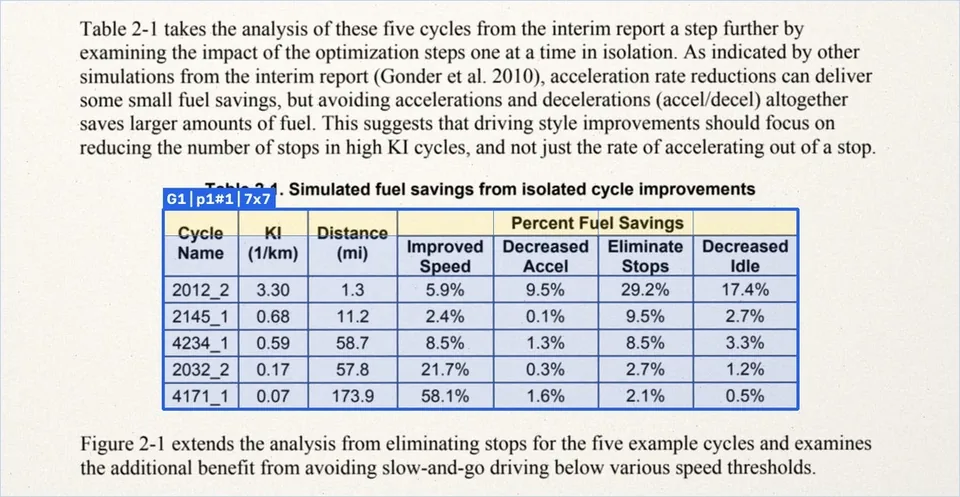
foo_scanned.pdf: auto-deskewed
(-1.74°), prose ignored, stacked Percent Fuel Savings
spanning header flattened cleanly.
Cycle Name,KI (1/km),Distance (mi),Percent Fuel Savings - Improved Speed,Percent Fuel Savings - Decreased Accel,Percent Fuel Savings - Eliminate Stops,Percent Fuel Savings - Decreased Idle
2012_2,3.30,1.3,5.9%,9.5%,29.2%,17.4%
2145_1,0.68,11.2,2.4%,0.1%,9.5%,2.7%
4234_1,0.59,58.7,8.5%,1.3%,8.5%,3.3%
2032_2,0.17,57.8,21.7%,0.3%,2.7%,1.2%
4171_1,0.07,173.9,58.1%,1.6%,2.1%,0.5%
Batch scanned PDFs offline with the CLI (unlimited pages & GPU)
Need to extract 100+ scanned pages or sensitive financial/medical records offline? Install the identical MIT-licensed engine locally—zero Java, Ghostscript, Poppler, or Tesseract binaries required:
pip install pdf-to-csv-table-extractor

# Auto-deskew + RapidOCR on a multi-page scanned PDF (multi-core CPU or GPU)
pdf2csv-tables extract scanned_statement.pdf --deskew --utf8-bom --workers 4 -o output/

# Force OCR on hybrid/broken-font PDFs in German
pdf2csv-tables extract rechnung_scan.pdf --text-source ocr --lang de -o output/
Frequently asked questions
How does TableCSV handle crooked or tilted scanned PDFs?
TableCSV automatically estimates page skew angle on image-only scans and rotates the page upright before grid line detection and OCR. For example, on our built-in tilted scan sample (foo_scanned.pdf, skewed ~1.8 degrees with warm paper gradients and JPEG noise), auto-deskew aligns the grid at -1.74 degrees and extracts all 5 data rows and stacked headers cleanly.
What happens if a PDF is a scanned image with a watermark or digital stamp?
Stamped or hybrid PDFs often contain a handful of vector text characters on top of a scanned table image, which breaks native-text-only tools. TableCSV inspects text-layer coverage per page and automatically falls back to RapidOCR when the table cells lack a real digital text layer, or you can pick Force OCR directly.
How many scanned pages can I convert free online vs locally?
The free web extractor processes up to 12 OCR pages per run (and up to 15 MB per file) strictly in RAM. Use the Pages input (e.g. 13-24) to process larger documents in batches, install the free open-source Python CLI for unlimited local pages on CPU/CUDA/ROCm, or contact us for managed Pro API access.
Does scanned PDF extraction support non-English or right-to-left (RTL) tables?
Yes. All 50 OCR languages are pre-baked into the server container, including right-to-left Arabic (ar), Persian (fa), and Urdu (ur) with python-bidi logical text ordering, plus European Latin, Cyrillic, Chinese, Japanese, Korean, Greek, Hindi, Thai, Tamil, Telugu, and Kannada.