
TableCSV vs. Camelot, Tabula-py, pdfplumber & Docling
Feature comparison: TableCSV vs. Camelot, Tabula-py, pdfplumber & Docling
TableCSV is the free hosted web interface for the open-source Python library
pdf-to-csv-table-extractor (MIT License). Here is how it compares to the
most widely used Python PDF table extraction libraries:
| Capability | TableCSV / pdf-to-csv-table-extractor | Camelot | Tabula-py | pdfplumber | Docling |
|---|---|---|---|---|---|
| Zero external OS binaries (no Java, Ghostscript, Tesseract, Poppler) | Yes | No (Ghostscript) | No (Java JVM) | Yes | Yes |
| Digital PDFs (fast native text layer) | Yes (0.95 s / 16 pages) | Yes | Yes | Yes | Yes |
| Scanned PDFs, tilted scans & image folders | Yes (auto-deskew + RapidOCR) | No | No | No | Yes (heavier DL models) |
| Stamped / hybrid scans (vector text + tilted scan) | Yes (automatic fallback) | No | No | No | Yes |
| Multi-page schema-matched CSV merging (repeated + headerless) | Yes (automatic) | Manual | Manual | Manual | Manual |
| 50 pre-baked OCR languages incl. 3 RTL (ar, fa, ur) | Yes (+ custom ONNX packs) | No OCR | No OCR | No OCR | Via OCR plugin |
| Lightweight install & CPU / NVIDIA CUDA / AMD ROCm | Yes (ONNX Runtime / PyTorch) | CPU only | CPU only | CPU only | PyTorch / heavier |
| Outputs | CSV, Excel BOM, ZIP, JSON, Markdown, pandas, polars | CSV, JSON, DataFrame | CSV, JSON, DataFrame | Lists / dicts | Markdown, JSON, DocTags |
Visual grid detection proof on real documents
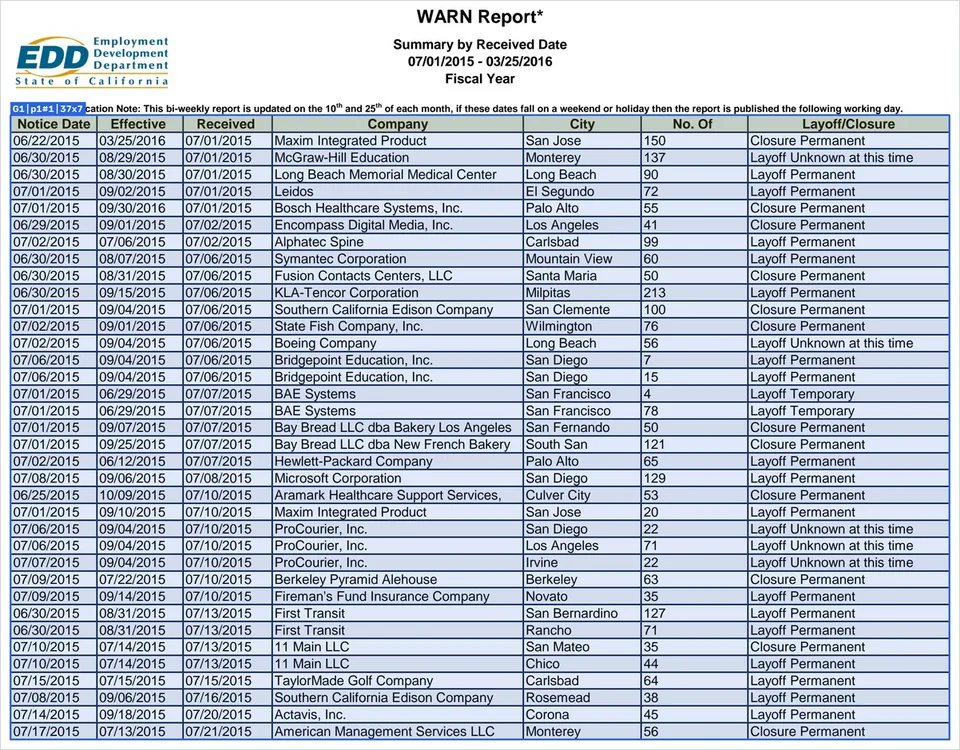
warn_report.pdf): all 16 pages / 643 rows extracted &
merged in 0.95 s via native PDF text boxes.
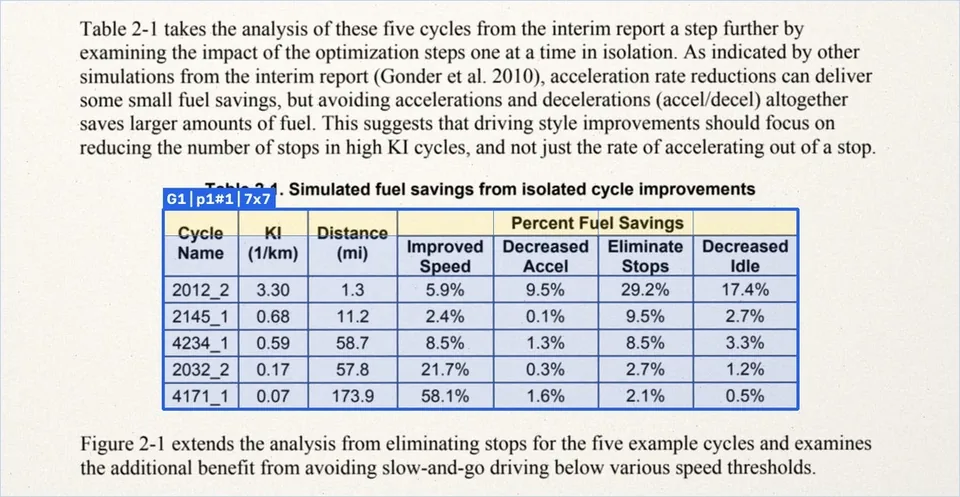
foo_scanned.pdf): auto-deskewed
-1.74° with stacked header flattening via OpenCV + RapidOCR.
Reproducible performance benchmarks
1. Native PDF text fast path vs. tuned CPU OCR
Measured on Intel Core Ultra 7 270K Plus, Python 3.14, ONNX Runtime
1.32.0, default 250 DPI across six public real-world sample PDFs:
| Sample PDF | Pages | Rows | Default (--text-source auto) | Forced CPU OCR (--text-source ocr) | Mode Notes |
|---|---|---|---|---|---|
| multiple_tables.pdf (2 tables + prose) | 1 | 10 | 0.05 s | 0.84 s | Digital PDF (native) |
| foo.pdf (prose + 7-col table) | 1 | 5 | 0.08 s | 1.49 s | Digital PDF (native) |
| twotables_1.pdf (2 tables + paragraphs) | 1 | 5 | 0.09 s | 1.62 s | Digital PDF (native) |
| background_checks.pdf (dense 56×25 grid) | 1 | 56 | 0.12 s | 5.72 s | Digital PDF (native) |
| warn_report.pdf (all 16 pages, CA WARN) | 16 | 643 | 0.95 s (16.8 p/s) | 17.91 s | Digital PDF (native + auto workers) |
| foo_scanned.pdf (tilted JPEG scan) | 1 | 5 | 0.55 s (--no-borderless) / 1.47 s | 0.55 s / 1.47 s | Image-only scan (auto → RapidOCR) |
Multi-core CPU scaling (warn_report.pdf, 16p / 643 rows):
Default --text-source auto drops from 1.14 s
(workers=1) to 0.95 s (workers=0 auto)—
58× faster than single-stream OCR. Forced CPU OCR drops from
29.26 s to 17.91 s with 4 parallel workers.
2. Pure OCR workload: single-thread CPU vs. GPU acceleration
On scanned PDFs and --text-source ocr workloads, RapidOCR accounts for
85%–97% of runtime. Head-to-head warm steady-state timings comparing CPU
(CPUExecutionProvider) vs. AMD Radeon RX 9070 XT
(ROCm 7.1, PyTorch HIP) at 250 DPI:
| Sample PDF | Pages | Rows (CPU / GPU) | CPU Total | GPU Total (RX 9070 XT) | Total Speedup | OCR Speedup |
|---|---|---|---|---|---|---|
| multiple_tables.pdf | 1 | 10 / 10 | 1.90 s | 0.50 s | 3.78× | 4.62× |
| twotables_1.pdf | 1 | 5 / 5 | 3.31 s | 1.01 s | 3.28× | 3.68× |
| foo.pdf | 1 | 5 / 5 | 2.92 s | 0.95 s | 3.08× | 3.59× |
| foo_scanned.pdf (tilted scan) | 1 | 5 / 5 | 2.60 s | 0.86 s | 3.03× | 3.72× |
| background_checks.pdf (56×25) | 1 | 56 / 56 | 9.47 s | 3.30 s | 2.87× | 3.03× |
| warn_report.pdf (16 pages) | 16 | 643 / 643 | 55.47 s | 19.79 s | 2.80× | 3.32× |
Which PDF table extractor should you choose?
-
Choose TableCSV /
pdf-to-csv-table-extractorif you need one zero-dependency tool for both fast digital PDFs and crooked scans/images, automatic multi-page schema merging (repeated headers + headerless continuations), 50-language / RTL OCR, or a private no-signup web extractor backed by an MIT local CLI. - Choose pdfplumber if you only process clean digital PDFs and want low-level access to individual characters, bounding boxes, and custom non-table rules.
- Choose Camelot or Tabula-py if you maintain legacy digital-only PDF pipelines already tuned around Ghostscript lattice parameters or Java Tabula templates.
- Choose Docling if you need full-document conversion (headings, body prose, figures, equations, DocTags) rather than lightweight CSV table extraction.
Reproduce these benchmarks yourself
git clone https://github.com/vitali84/pdf-to-csv-table-extactor.git
cd pdf-to-csv-table-extactor
uv sync --extra dev

# Default auto mode (native PDF text fast path + automatic OCR fallback)
uv run python benchmarks/benchmark.py --device cpu --text-source auto

# Pure OCR benchmark on CPU or GPU (NVIDIA CUDA / AMD ROCm)
uv run python benchmarks/benchmark.py --device cpu --text-source ocr --json bench_cpu.json
uv run --no-sync python benchmarks/benchmark.py \
  --device auto --text-source ocr --json bench_gpu.json
Frequently asked questions
How is TableCSV different from Camelot and Tabula-py?
Camelot requires Ghostscript and Tabula-py requires a Java JVM, and both only work on digital PDFs with embedded text layers and require manual post-processing to merge multi-page tables. TableCSV (pdf-to-csv-table-extractor) needs zero external OS binaries, handles both digital PDFs (0.95 s for 16 pages) and tilted scanned PDFs/images via auto-deskew + RapidOCR, and merges multi-page tables automatically by schema.
When should I choose pdfplumber or Docling instead of TableCSV?
Choose pdfplumber when you need fine-grained programmatic access to arbitrary PDF characters, vector rectangles, or custom non-table coordinate scraping on clean digital PDFs. Choose Docling when you want full-document layout parsing (prose headings, figures, reading order, DocTags) rather than lightweight, high-speed CSV table extraction.
How fast is TableCSV on multi-page digital PDFs vs scanned PDFs?
On an Intel Core Ultra 7 270K Plus (Python 3.14, ONNX Runtime 1.32.0, 250 DPI), TableCSV extracts and merges all 16 pages (643 rows) of the California WARN report in 0.95 seconds via the automatic native text fast path (58x faster than single-stream OCR), and extracts the 56x25 FBI NICS dense table in 0.12 seconds. On pure OCR workloads, GPU acceleration (CUDA or AMD ROCm) delivers 2.8x to 3.8x faster end-to-end throughput.
Can I reproduce these benchmarks on my own machine?
Yes. Every benchmark PDF is included in the public GitHub repository alongside `benchmarks/benchmark.py`. Clone the repo and run `uv run python benchmarks/benchmark.py --device cpu --text-source auto` (or `--text-source ocr` with `--device auto` on a CUDA/ROCm GPU).